
Encounter Tracker
The routes of the region sit in the order of the game. Each one shows the catch, a missed encounter, or the route you are on. The same route opens on the Maps page with its encounter table.
The routes of the region sit in the order of the game. Each one shows the catch, a missed encounter, or the route you are on. The same route opens on the Maps page with its encounter table.
Track a run together with up to four players, locally or online using an invite code. Each player manages their own party and catches; online changes sync live. Optional Soul-Link groups catches from the same route. The tracker links them automatically. If a linked Pokémon dies, enabled Death Cascade also marks its partners as dead. With Death Cascade off, the partners move from the party to the box.
Drop in a save file and party, box Pokémon, badges, and progress land in your run or team.
Supported file types: .sav, .srm, .xps, .sps, and .gsv
Connect the file once in Chrome or Edge on a computer. When the emulator rewrites it, levels, evolutions, moves, and badges update on their own. New catches and deaths still wait for your confirmation.


 Red
Red Green
Green Blue
Blue Yellow
 Gold
Gold Silver
 Crystal
 Ruby
Ruby Sapphire
 Emerald
 FireRed
 LeafGreen
 Diamond
 Pearl
Pearl Platinum
 HeartGold
 SoulSilver
 Black
Black White
White Black 2
 White 2
 X
X Y
Y Omega Ruby
 Alpha Sapphire
 Sun
Sun Moon
Moon Ultra Sun
 Ultra Moon
 Sword
Sword Shield
 Legends: Arceus
 Scarlet
 Violet
Boss teams depend on the edition and mode. They include gym leaders, the Elite Four, rivals and the evil team. Each team shows its Pokémon and the supplied levels, moves, abilities and held items.
Gym leaders

 GeodudeLV 12OnixLV 14
Rival fights · Player starter: Grass


 PidgeotLV 37ExeggcuteLV 38GyaradosLV 35AlakazamLV 35CharizardLV 40
Elite Four


 DewgongLV 52CloysterLV 51SlowbroLV 52JynxLV 54LaprasLV 54
Evil team

 OnixLV 25RhyhornLV 24KangaskhanLV 29
A boss can have a different team depending on the game, mode or player starter. Expand a boss to see the listed Pokémon and their team data.
In the run’s Versus tab, a Pokémon from a supported boss team can be selected as an opponent. The damage calculator uses the supplied values to compare it with your party.

On the Team page, two grids cover the chosen game. The left grid shows how hard each attacking type hits the party and who can shrug it off. The right grid shows which types the moves hit super-effectively. Gold marks a gap: nobody hits that type super-effectively.

Rules live on the run: dupes, shiny, nicknames, level cap, randomizer. Presets are Classic, Hardcore-Lite, and Soul Link.
Red, Blue, Yellow, Gold, Silver, Crystal, Ruby, Sapphire, FireRed, LeafGreen, Emerald, Diamond, Pearl, Platinum, HeartGold, SoulSilver, Black, White, Black 2, White 2, X, Y, Omega Ruby, Alpha Sapphire, Sun, Moon, Ultra Sun, Ultra Moon, Sword, Shield, Brilliant Diamond, Shining Pearl, Scarlet, Violet
Blazing Emerald, Emerald Kaizo, Emerald Run & Bun, Glazed, Inclement Emerald, New Generations, Radical Red, Unbound, Renegade Platinum, Sacred Gold, Storm Silver, Blaze Black, Blaze Black / Volt White 2 Redux, Volt White, Rising Ruby, Sinking Sapphire, Insurgence
From a cloud run's header, the owner enables the overlay and pastes the link into OBS as a browser source. The page shows the run, the party with nicknames, the current route, badges, and the death counter. Changes to the run appear live in the stream. Access is token-protected and the token can be rotated.
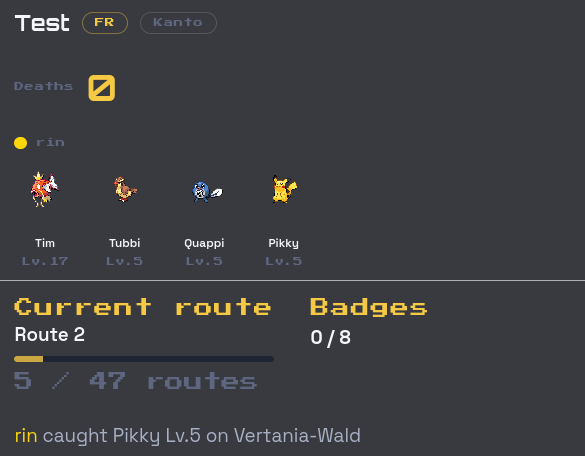
A stream overlay for the party and the current route sits in the run header.
Before the first catch, choose the supported Dupes, Shiny, nickname and level-cap settings in the Nuzlocke tracker. Keep additional house rules on a separate rule sheet.
The Wiki articles explain the core rules, optional clauses, Hardcore and Soul Link. They help with deciding on a ruleset before the run begins.
Open Nuzlocke WikiSTART A RUN
The MyPokePanion Nuzlocke tracker keeps encounter outcomes, the active party, boxed Pokémon and permanent losses in one run. Sign in to create a run, choose the game and review the supported rule settings. Log each area as it is played and update the team after changes, so the next session starts with the current roster.
Choose the game and a source route checklist or manual log. Dupes, Shiny, nickname and level-cap settings stay on the run. Keep reset and other house rules on a separate rule sheet.
Each route stores the first Pokémon that appeared and the outcome. A missed catch still closes the route when the rules treat that encounter as used.
The active party, boxed Pokémon and dead Pokémon have separate places in the run. This shows which Pokémon can still be used and which have been lost.
The same regional atlas as the Maps pages shows locations and listed Pokémon. Record the Pokémon actually encountered and whether it was caught, missed or skipped under the Dupes Clause.
RUN CONTROL
Record the first encounter for each route and see which catches are still open.
Keep the current team, boxed Pokémon and fallen partners in one run log.
Choose the supported Dupes, Shiny, nickname and level-cap settings. Keep additional house rules on a separate rule sheet.
Kanto, Johto, Hoenn, Sinnoh and Unova maps show locations and listed Pokémon. Record actual encounters and their outcomes in the run log.
Track a personal challenge or share a run with partners through an invite code.
Create a run without an install and return to its team, encounters and losses from the browser.
GAME COVERAGE
Runs can use the selected game’s source route checklist when available. Quick starts open FireRed, HeartGold, Emerald, Platinum and Black/White. Atlas maps cover Kanto, Johto, Hoenn, Sinnoh and Unova. Each run keeps route outcomes next to the team and loss history.
SHARED RUNS
Create a shared run, invite partners with a code and keep encounters, teams and losses in sync. Choose the supported settings for Soul Link or another group format, and agree on additional house rules before playing.
Each player keeps a party. With Soul Link and its cascade enabled, recording a death also marks living linked Pokémon dead. Recording a missed encounter marks living linked Pokémon lost. With the cascade off, those Pokémon are boxed instead. Boxing a linked team member also boxes its active partners. Keep gender, type and reset policies on a separate rule sheet.
QUESTIONS & ANSWERS
The selected game can provide a source route checklist when available. Quick starts open FireRed, HeartGold, Emerald, Platinum and Black/White. Source routes are separate from the Kanto–Unova atlas maps.
Yes. Supported games beyond Generation 5 can provide source route checklists. When those are unavailable, a manual checklist still records encounters, supported rule settings, teams and losses. An atlas map is not required.
Yes. One invite code adds partners to the same run. Each player keeps a party; encounters and losses sit on the shared log.
It checks logged entries against occupied route slots, enabled evolution-family Dupes and required nicknames. Marked shiny catches bypass route-slot and Dupes checks when Shiny is enabled; required nicknames still apply. Soul Link effects follow the run’s switches. Gift, static-encounter, gender, type and reset policies need a separate rule sheet.
Yes. Save the route outcome that happened. This keeps an area from looking open when the run rules consider its encounter used.
Yes. Kanto, Johto, Hoenn, Sinnoh and Unova use the same atlas as the Maps pages, with locations and listed Pokémon. Source route checklists can also exist without a map. The log records what actually happened.
Yes. The active party, boxed Pokémon and dead Pokémon are shown separately within the same run. Failed catches and skipped duplicates use the Missed and Duped statuses in the route log.
No. The tracker is a website. Create and manage a run in the browser; there is no app-store install.
Yes. Choose the Soul Link and cascade settings in the run. Enabled linking applies automatic partner effects to recorded deaths, misses and boxing. Keep additional gender, type and reset policies on a separate rule sheet.
PLAN THE NEXT STEP
Set up a shared run for linked partners.
Plan a Kanto run with route tracking.
Prepare a Hoenn run and its encounters.
Keep a Sinnoh run organized route by route.
Track a Johto run from the first encounter onward.
Plan an Unova run with the regional tracker.
Check routes, locations and listed Pokémon.
Check type coverage before the next major battle.
Compare matchups and damage for a difficult fight.
Replay a gym or boss 1v1 before the run risks a faint.


